How streaming plays your music
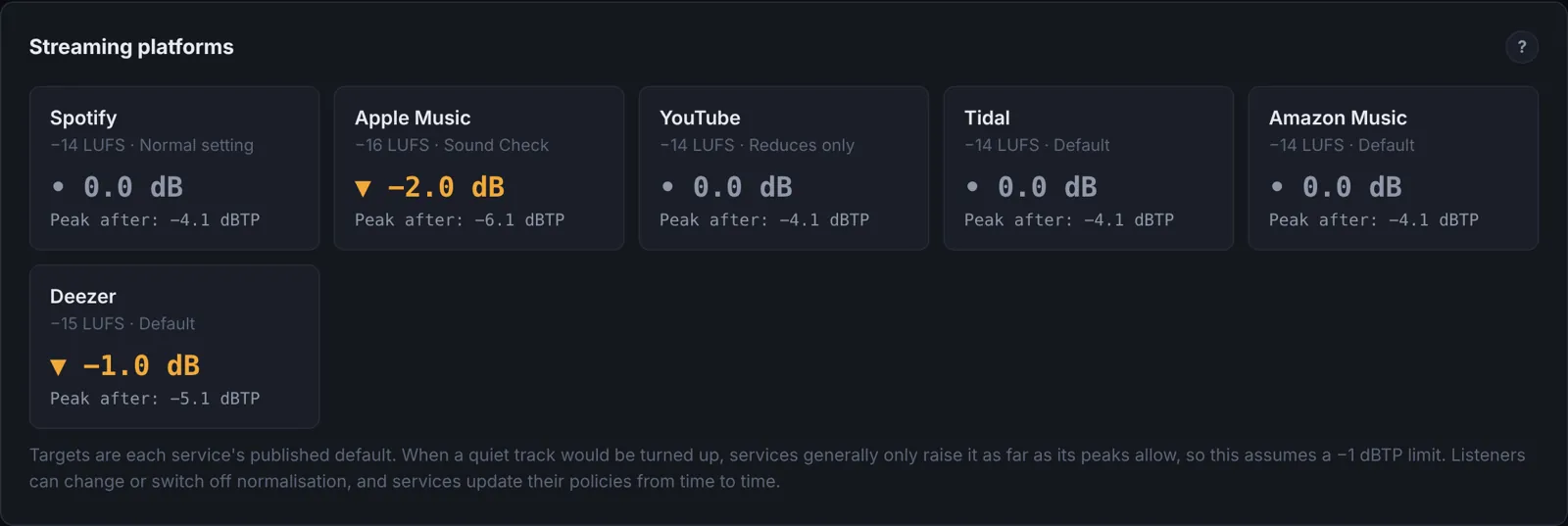
Spotify, Apple Music, YouTube, Tidal and the other big services measure the loudness of every track and turn it up or down so that everything plays at about the same level. This is called loudness normalisation. Spotify, for example, adjusts tracks to −14 LUFS by default.
That changes the old rules. A master pushed to −8 LUFS doesn't play louder on Spotify than one at −14: it is turned down 6 dB, and all that is left of the extra loudness is the limiting that was used to get there. What decides how big a track sounds next to others is no longer how loud the file is, but how full and clear it is at the same loudness.
| Service | Default level | Notes |
|---|---|---|
| Spotify | −14 LUFS | Premium listeners can choose Loud (−11) or Quiet (−19). Quiet tracks are only turned up as far as their peaks allow, keeping 1 dB of headroom. |
| Apple Music | about −16 LUFS | Applied when Sound Check is on. |
| YouTube | about −14 LUFS | Turns loud tracks down, but doesn't turn quiet ones up. |
| Tidal, Amazon Music | about −14 LUFS | |
| Deezer | about −15 LUFS | |
| SoundCloud | about −14 LUFS | Normalises playback. It recommends keeping the true peak under −1 dB, or under −2 dB for masters louder than −14, because its transcoding adds distortion. |
| Bandcamp, DJ software, downloads | none | Files play at the level you made them. |
Services publish and change their policies from time to time, and listeners can switch normalisation off. Spotify's figures are from its loudness normalisation guide; the others are widely reported defaults.
- On streaming, extra loudness is taken away again. Density (how full the track sounds) is what you keep.
- A track that can't reach −14 without its peaks going over −1 dBTP plays quieter than everything around it on Spotify.
- Where nothing normalises (Bandcamp, downloads, DJ sets), a louder file does play louder. You can master for both: see Density and PLR.